If you see a Smart Core error message in-game, it usually means that installed core files are outdated, duplicated, or mismatched. These problems are easy to fix by reinstalling the correct versions.
Below are the two most common error messages and how to resolve them.
Smart Core Version Mismatch Error
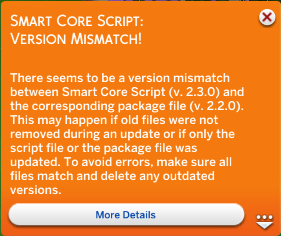
This error appears when the Smart Core script file and package file do not use the same version number.
Smart Core always consists of two required files: .ts4script and .package.
Both files must always match exactly.
How to fix it
- Delete all Smart Core files from your
Modsfolder. - Download the latest version again.
- Install both the script and the package together.
-
Delete
localthumbcache.packagefrom your Sims 4 folder:Documents > Electronic Arts > The Sims 4 - Start the game again.
Required Core Version Error
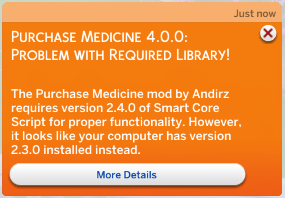
This error means that a mod requires a different Smart Core version than the one currently installed.
Common reasons:
- Smart Core Script is outdated
- Multiple Smart Core versions are installed
- Duplicate copies of the same mod exist
- Different mods require different Smart Core versions
Sometimes the game may even request an older version than the one already installed. This almost always indicates duplicate files somewhere in the Mods folder.
How to fix it
- Install the Smart Core version shown in the error message
- Remove all duplicate Smart Core files
- Check all subfolders inside your Mods directory
- Remove duplicate versions of the mod mentioned in the message
- Make sure Script Mods are enabled in game settings
Which Core Script Do You Need?
The required dependency is always listed directly in the error message. Install only the version specified in the message. If multiple mods require Smart Core Script, all of them must use the same version. It is not possible to run different Smart Core versions at the same time. If one mod requests a newer version than another, update all affected mods to versions compatible with the latest Smart Core release. Older core versions are not supported.
Still seeing the error?
If the issue persists after following these steps:
- check your Mods folder for duplicate files
- make sure all dependencies are updated
- test the mod in a fresh save
If necessary, submit a proper support request on Discord and include your log files.