Andirz.com
Smart Gender Cheats
compatible

Smart Gender Cheats

Instant control over all CAS gender settings directly in Live Mode—no more switching menus for updates.


File Type Package
Version 1.8.1
Last Update Jan 14, 2026

Description

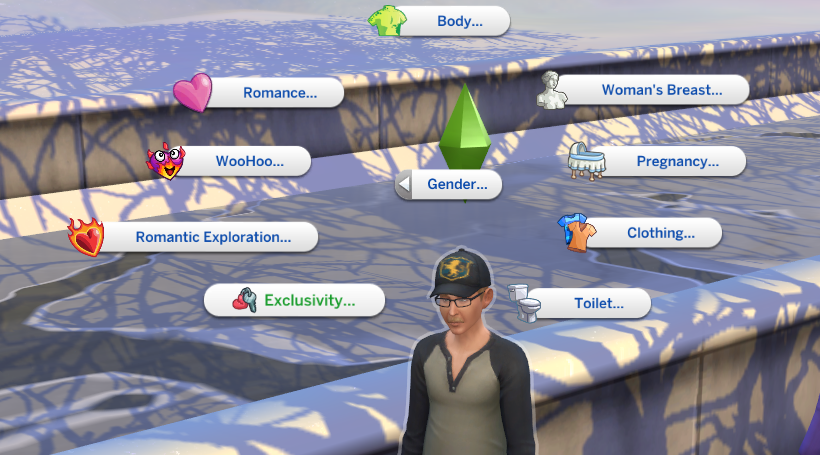
This mod allows you to change all CAS gender settings for all Sims — including active Sims and NPCs — directly in Live Mode. All interactions are available via the cheat menu (hold the Shift key). With just a single mouse click, you can adjust gender-related CAS options in-game without switching to CAS.

Key Features

You can instantly toggle the following options with a single click:

  • Body Frame (Feminine, Masculine)
  • Pregnancy (Can Impregnate, Can Be Impregnated, Both, Neither)
  • Breasts (Have Breasts, Have No Breasts)
  • Milk Production (Can Produce Milk, Cannot Produce Milk)
  • Clothing Preference (Menswear, Womenswear)
  • Toilet Use (Standing, Sitting)
  • Genitals (Vagina, Penis) — WickedWhims users only
  • WooHoo Preference (Women & Men, Women, Men, Neither)
  • Romantic Preference (Women & Men, Women, Men, Neither)
  • Sexuality Exploration (Yes, No)
  • Romantic Boundaries (Yes, No)
  • Jealousy Triggers
  • Facial & Body Hair Shaving

Language & Translations

This mod is available in the following languages:

  • English, German, Spanish, and Russian – by me.
  • Brazilian Portuguese – by Nymphieta.
  • Chinese and Simplified Chinese – by Orchard Team.
  • French – by Mollory.
  • Italian – by vale93_games.
Translations

Missing translations fall back to English.
You can help by adding new translations or improving existing ones.

Installation Guide

Package Installation
  • Extract: Place .package files into the /Mods folder.
  • Update: Delete the previous version before installing any update.
  • Cache: Clear localthumbcache.package for a clean game environment.
New to modding? Check out this Modding Tutorial.
Usage Policy — Terms of Use
Allowed
  • Using this mod in personal gameplay
  • Showing the mod in videos, streams, or screenshots
Not Allowed
  • Reuploading or redistributing the mod files
  • Including the mod in mod packs or archives