Before we begin
You do not need Python or advanced XML to understand tuning. The important part is recognizing the data structures and the relationships between resources. Once you can distinguish a scalar value, an enum, a list, a structured group and a reference, an unfamiliar tuning file becomes much easier to read.
Structured game data that configures systems and behavior.
The readable text representation normally used when inspecting and editing tuning.
Companion binary/table data required by some tuning resource types.
A link from one resource to another by numeric ID.
1. What is tuning?
A large part of The Sims 4 gameplay is configured through tuning resources. They describe values, choices, lists, tests and references to other resources.
Python provides engine systems and classes; tuning supplies much of the data those systems consume. Many mods therefore need no Python at all if the game already provides the behavior the modder wants to configure.
Python often defines what a system can do. Tuning usually defines how one concrete resource uses that system.
XML is not the tuning system itself. XML is the readable representation modders usually inspect and edit.
2. Anatomy of a tuning resource
Consider this opening element:
<I c="Skill" i="statistic" m="statistics.skill" n="statistic_Skill_AdultMajor_RocketScience" s="16710">
IThe root element represents a tuning instance.cThe tuning class. Here the resource uses the Skill class.iThe broad tuning/resource-manager category, here statistic.mThe Python module containing the related class.nThe readable internal tuning name.sThe numeric tuning instance ID.The name is mainly useful to humans. The numeric ID is what makes the resource addressable by other tuning.
3. IDs, comments and references
A reference to another tuning resource often looks like this:
<T>16710<!--statistic_Skill_AdultMajor_RocketScience--></T>
The game uses 16710. The XML comment is only a human-readable label.
Who creates the ID?
For EA resources, EA already assigned the ID when the game content was built. When you export an EA tuning resource, Sims 4 Studio simply shows the ID that already exists.
For your own custom tuning, you create the ID. The normal modding workflow is to derive it from a unique internal tuning name with a hash function.
You choose a unique tuning name
            ↓
Sims 4 Studio Hash Generator
            ↓
        FNV32 / FNV64
            ↓
      numeric Instance ID
For example:
andirz_MyMod_CustomInteraction
is a name you invent. You then open Sims 4 Studio → Tools → Hash Generator, enter that name, and use the appropriate FNV result as the resource Instance.
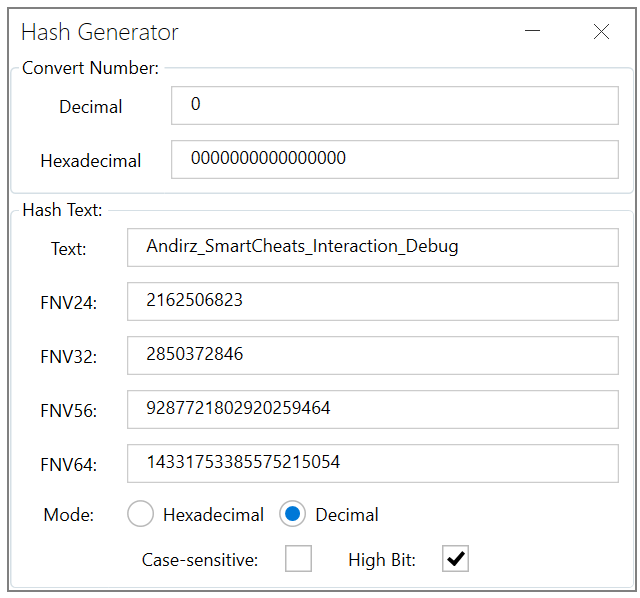
The screenshot shows why modders often talk about the same ID in two different forms. Sims 4 Studio gives you the generated hash for the resource key, while XML normally displays the tuning ID as a decimal integer. You are not creating two IDs: you are looking at one number represented differently.
Use a stable prefix such as your creator name plus the mod and resource name. Avoid generic names that another modder could easily choose.
Open Sims 4 Studio's Hash Generator and enter the exact name. The same text always produces the same hash.
Most custom tuning commonly uses FNV64; some systems have special requirements. Traits are the important exception discussed below: use FNV32.
Put the generated value into the package resource's Instance field when creating or duplicating the resource.
The XML s="..." value is the same tuning ID, normally written in decimal form.
Decimal vs hexadecimal: where do you see each one?
The same ID can be displayed in different numeral systems.
Decimal:      16710
Hexadecimal:  0x4146
They are the same integer.
s="..." and ordinary tuning references are normally exported as decimal integers.For example:
Sims 4 Studio Instance: 0xA1B2C3D4
XML tuning:              s="2712847316"
These represent the same 32-bit value.
The package resource key
A DBPF package resource is identified by a key commonly represented as:
Type + Group + Instance
These three fields have different jobs:
So two resources can deliberately share an Instance while still being different package resources because their Type differs. Trait tuning plus its companion SimData is the classic example.
FNV32 and FNV64
- FNV32 produces a value that fits in 32 bits: at most 8 hexadecimal digits.
- FNV64 produces a value that fits in 64 bits: at most 16 hexadecimal digits.
- The correct width depends on the resource system.
For ordinary custom tuning, FNV64 is common. Custom traits should use FNV32, and their matching SimData must use the same Instance. See Traits & Preferences → Trait IDs & SimData.
Other resources may already reference it. If it changes, references and companion resources may also need to be updated.
4. Common data structures: T, E, L, U and V
The short XML tags represent familiar data structures. The examples below use deliberately fake loot names so that the structure is realistic without pretending that the sample IDs are EA resources.
TScalar / single valueA single tunable value or reference.
<T n="loot">100000001<!--loot_Example_AddBuff--></T>EEnum valueOne named value chosen from a predefined enumeration.
<E n="subject">Actor</E>LListAn ordered collection containing several values or child structures.
<L n="loot_actions">
  <T>100000001<!--loot_Example_AddBuff--></T>
  <T>100000002<!--loot_Example_GiveMoney--></T>
</L>UStructured group / recordA compound value containing several named fields.
<U n="entry">
  <T n="loot">100000003<!--loot_Example_RemoveTrait--></T>
  <T n="weight">5</T>
</U>VVariantSelects one branch from several possible shapes.
<V n="action" t="loot">
  <U n="loot">
    <T n="loot">100000001<!--loot_Example_AddBuff--></T>
  </U>
</V>
L + UList of recordsReal tuning frequently nests structures inside other structures.
<L n="entries">
  <U><T n="loot">100000001<!--loot_Example_AddBuff--></T></U>
  <U><T n="loot">100000002<!--loot_Example_GiveMoney--></T></U>
</L>
The n attribute identifies the field being configured. The tag tells you the shape of the data, while n="..." tells you which tunable field receives that data.
5. SimData: the companion data resource
Some tuning types also use a companion SimData resource. SimData stores structured data in a binary/table-oriented form that some game systems expect alongside tuning.
XML Tuning = hierarchical configuration you normally read/edit
SimData    = companion binary/table data used by some resource types
For resource types that require SimData, the companion resource normally uses the same Instance ID as the tuning resource.
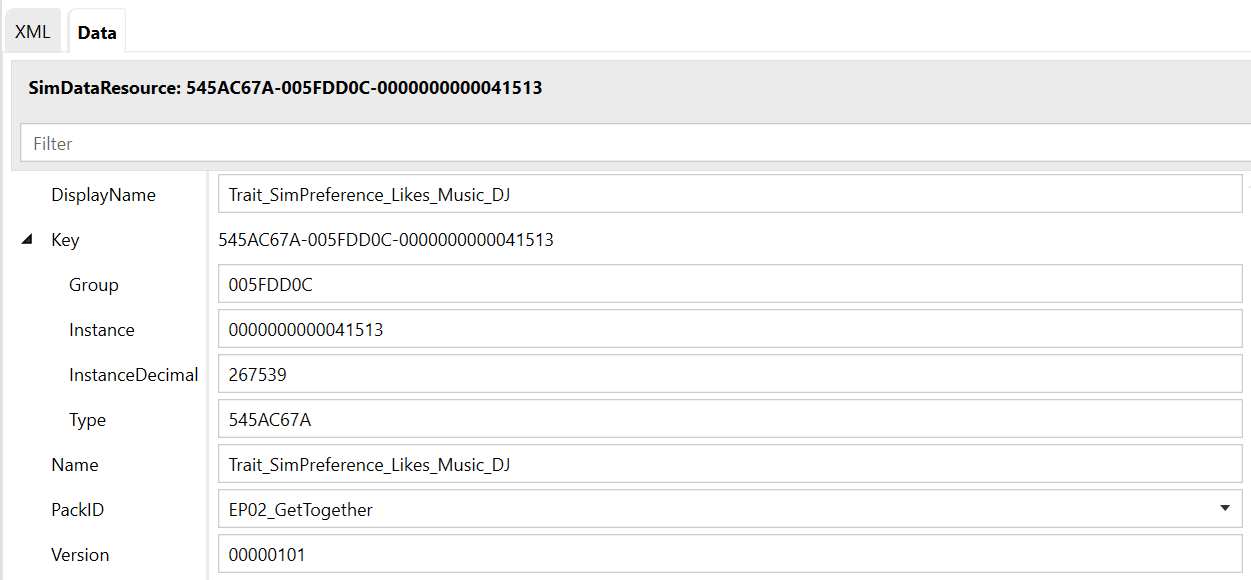
In the Sims 4 Studio resource list, compare the columns rather than just the resource names. The Type tells Sims 4 Studio and the game what kind of resource each row contains. The tuning row and the SimData row therefore have different Type values. Their Instance, however, is intentionally identical so the companion data belongs to the same logical tuning resource. The Group is another part of the package key and is normally kept consistent with the resource pattern you cloned or created.
Type: tuning/XML · Instance: 0x00ABCDEFContains the readable Trait fields and references.
Type: SimData · Instance: 0x00ABCDEFDifferent resource type, deliberately matching Instance.
Custom traits are the important beginner example: keep Trait tuning and matching SimData together. If you change the trait’s Instance but leave the old SimData Instance behind, the package may still contain both rows while the logical pair is broken.
Matching companions share the relevant Instance; they do not become the same resource. Type + Group + Instance together identify a package entry.
6. How to read tuning without guessing
Read the root attributes: class, category, module, name and ID.
Look at the names in n="...".
Is it a scalar, enum, list, structured group or variant?
Ask whether a number is a normal value or the ID of another tuning resource.
If this resource type uses SimData, confirm that it exists and uses the matching Instance.
Inspect referenced tuning instead of guessing from comments or names.
What you should know now
You should now be able to answer: Who assigned this ID? If it is mine, how did I generate it? Is the same number being shown in decimal or hexadecimal? What do Type, Group and Instance identify? Which fields are configured? Which values are references? Does the resource need companion SimData?