Smart Core errors usually mean that installed files are outdated, duplicated, or do not belong to the same version.
Version Mismatch
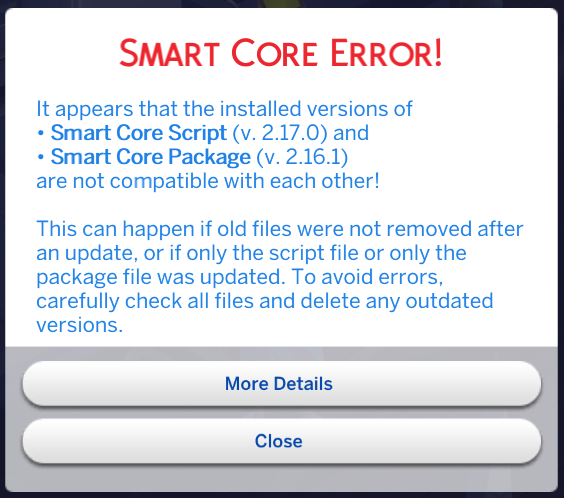
This error appears when the Smart Core .ts4script and .package files do not use the same version.
Smart Core requires both files, and they should always be installed as a matching pair.

Fix
- Delete all existing Smart Core files from your
Modsfolder. - Download the current Smart Core release again.
- Install both the
.ts4scriptand.packagefrom that release. - Delete
localthumbcache.package. - Restart the game.
Required Core Version
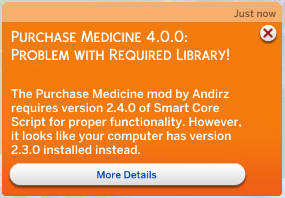
This error means that an installed mod requires a different Smart Core version from the one the game is currently loading.
Common causes include:
- Smart Core is outdated;
- multiple Smart Core versions are installed;
- an old copy is hidden in another Mods subfolder;
- duplicate versions of the dependent mod are installed.
If the game asks for an older Smart Core version than the one you deliberately installed, a duplicate or outdated mod file is a likely cause.
Fix
- Remove duplicate Smart Core files.
- Remove duplicate or outdated versions of the mod named in the message.
- Install the current versions of both Smart Core and the dependent mod.
- Confirm that Script Mods are enabled.
- Delete
localthumbcache.packageand test again.
If the Error Remains
Test with only Smart Core and the affected mod installed. If the warning disappears, another file in the full Mods folder is interfering.
Need to isolate another file?
Use Finding Broken Mods to narrow down duplicates or conflicting mods.
Use Finding Broken Mods to narrow down duplicates or conflicting mods.
Need support?
See Requesting Mod Support before posting logs or screenshots.
See Requesting Mod Support before posting logs or screenshots.